How to Remove Password Protection from an Excel File or Sheet
Locked out of your own data? Whether you forgot the password to an old workbook or need to unprotect a read-only sheet to make edits, this guide covers every native method and safe workaround to regain access to your Excel files.
Editorial Team · Last Updated: October 2023 · 12 min read
Quick Answer
If you know the password: Open the Excel file, go to File > Info > Protect Workbook > Encrypt with Password, delete the hidden dots in the password field, and click OK. Save the file. If you forgot the password: Sheet protection can often be removed by renaming the .xlsx file to .zip and editing the internal XML code. File-level "open" passwords require the original password, specialized recovery software, or a restored backup.
What Happens When You Need to Remove Password Protection from Excel?
Microsoft Excel offers several layers of password protection, and removing them depends entirely on which type of lock is active. Before diving into the technical steps, it is vital to understand the difference between Sheet Protection (which restricts editing) and File Encryption (which restricts opening the document entirely).
Ownership & Legality Notice: The methods detailed in this guide are intended exclusively for recovering access to your own files or files you have authorized administrative access to. Bypassing security on documents you do not own may violate digital rights management (DRM) laws, corporate compliance policies, and ethical guidelines.
Open Password vs Permissions Password — Explained
When you search for how to remove password protection from excel file, you usually face one of two barriers:
The Open Password (File Encryption): You click the file, and Excel immediately prompts for a password before showing any data. This uses strong AES encryption. If you forget this password, there is no simple "hack" to bypass it without advanced brute-force recovery.
The Permissions Password (Sheet/Workbook Protection): You can open the file and view the data, but if you try to type in a cell, you get a warning that the sheet is protected. Because the data is already loaded in your computer's memory, this type of protection is much weaker and can often be removed without the password.
Which method do you need?
Answer two quick questions to find the exact steps to unlock your specific Excel file.
1. What happens when you try to use the Excel file?
Because you can see the data, you can rename the file to .zip and delete the protection tag in the code. See step-by-step tutorial below ↓
Recommended Action
Clear the File Encryption
Open the file with your password, go to File > Info > Protect Workbook, and clear the password field. See detailed steps below ↓
Warning
File Encryption Recovery Required
If you cannot open the file, the data is encrypted. You will need to restore from a backup or use authorized recovery software. Read about recovery options ↓
Remove Excel Sheet Password — With and Without Password
If your document is restricted from editing but you can view the data, here is how to unprotect an Excel sheet.
Method 1: Unprotect Excel Sheet (If you know the password)
This is the standard, built-in method. Use this when you want to permanently remove password from excel protected sheet so colleagues can edit it freely.
Open the workbook
Navigate to the specific worksheet tab at the bottom that is currently locked.
Go to the Review tab
On the top Excel ribbon, click Review, then click Unprotect Sheet.
Enter the password
Type the password in the dialog box and click OK. Save the document (Ctrl+S) to permanently remove the restriction.
Method 2: Remove password protection from excel without password (The XML Edit)
If you forgot the permissions password to a sheet, you can manually remove the lock. Because modern Excel files (.xlsx) are actually compressed ZIP archives containing XML text files, you can open them up and delete the line of code that locks the sheet.
Pro Tip: Always make a copy of your Excel file before attempting this method. If you delete the wrong line of code, the file could become corrupted.
Create a backup copy of your .xlsx file.
Right-click the file and rename the extension from .xlsx to .zip. (If you don't see extensions, go to the View tab in File Explorer and check "File name extensions").
Double-click the new ZIP file to open it.
Navigate to the xl folder, then the worksheets folder.
You will see files named sheet1.xml, sheet2.xml, etc. Drag the locked sheet's XML file out of the ZIP and onto your desktop.
Right-click the XML file on your desktop and open it with Notepad (Windows) or TextEdit (Mac).
Press Ctrl+F and search for sheetProtection.
Delete the entire tag that starts with <sheetProtection and ends with />.
Highlight and delete the entire block shown above in your XML file.
Save the Notepad file and close it.
Drag the edited XML file from your desktop back into the ZIP folder, replacing the old one.
Rename the file extension from .zip back to .xlsx. Your sheet is now unprotected.
How to Remove Password Protection from Excel Files (Open Passwords)
If your file requires a password before it even opens, you are dealing with AES file encryption.
How to remove the open password from an Excel file
If you know the password but want to remove it so others can open the file freely:
Open the Excel file and enter the password.
Go to File > Info.
Click the Protect Workbook dropdown.
Select Encrypt with Password.
A dialog box will appear showing hidden dots (your current password). Delete the dots so the field is entirely blank.
Click OK, then Save the file. The document is now decrypted.
What to Do If You Forget a Document Password
If you are searching for how do I remove password protection from an Excel file that you cannot open, the reality is difficult. Microsoft uses AES-256 encryption. There is no hidden backdoor.
Check Keychains/Password Managers: If you use a password manager, search it for the file name. Check macOS Keychain Access or Windows Credential Manager.
Restore Previous Versions: Right-click the file in Windows, select Properties, and check the "Previous Versions" tab. Sometimes an older, unencrypted draft is saved in Shadow Copies.
Cloud History: If the file was saved in OneDrive or Google Drive, check the version history. You might find an unencrypted version uploaded previously.
Brute Force Tools: Commercial password recovery tools can attempt to guess the password. If the password was short (under 6 characters), it might take minutes. If it was a complex 12-character phrase, it could take centuries.
Stop Wrestling with Excel Passwords. Secure Your Files the Right Way.
Excel's built-in password protection is notoriously flawed. Sheet passwords can be hacked in two minutes by renaming a file to .zip, and file passwords have to be manually typed every single time you open a document. If you need to secure financial data, HR records, or personal archives, you need proper folder-level security.
Why Document Password Protection Is Not the Same as Real Encryption
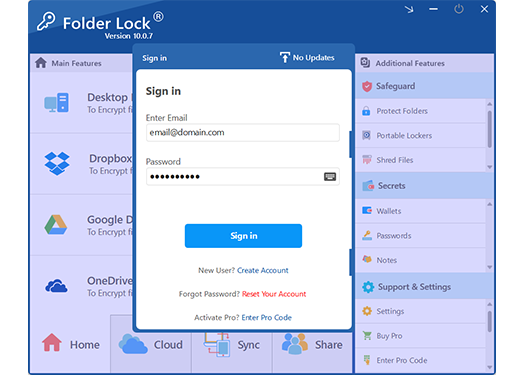
Relying on Excel's native 'Protect Sheet' feature leaves your data vulnerable to basic workarounds. Here is how dedicated document security software like Folder Lock changes the paradigm.
Kernel-Level Security
Protect multiple files at once
Instead of opening 50 Excel spreadsheets to type in a password one by one, you can place them all in a single encrypted locker. Folder Lock uses kernel-level hiding, meaning your locked documents remain entirely invisible and inaccessible—even if a thief boots your computer in Safe Mode.
Native Cloud Lockers
Secure cloud migration
Syncing sensitive spreadsheets to the cloud is risky. Folder Lock solves this by integrating directly with Dropbox, Google Drive, and OneDrive. It encrypts your files locally before they are uploaded, ensuring that if your cloud provider is ever breached, your data remains an unreadable vault.
Portable Security
USB drive password protection
Need to take your financial spreadsheets on the go? Folder Lock can generate self-executing Portable Lockers. You can drop these onto a USB flash drive or burn them to a disc, ensuring your data stays safe and accessible on other computers, even without the software installed.
Cross-Platform Sync
Access data on any device
Your workflow shouldn't be chained to a single desk. With dedicated applications for Windows, macOS, iOS, and Android, your encrypted lockers sync effortlessly. You can lock an Excel file on your PC and securely access it from your iPhone during a commute.
Data Destruction
Shred files beyond recovery
When you delete an old Excel draft, Windows leaves ghost data on your hard drive that recovery software can easily retrieve. Folder Lock includes a robust file shredder that permanently destroys deleted files and wipes empty drive space, ensuring your past edits are gone forever.
Beyond Documents
Secure Wallets & Notes
Not all sensitive data fits neatly into a spreadsheet. Folder Lock includes specialized, encrypted digital wallets to store your banking details, credit card numbers, and system passwords, alongside secure note-taking features to keep your private thoughts heavily guarded.
Best for: Total local and cloud document security.
Troubleshooting & Advanced Solutions
How to use VBA to remove Excel sheet protection
If you are using an older version of Excel (2010 or earlier) and the XML rename method is too tedious, you can run a VBA macro to brute-force the internal sheet password lock. Note: Microsoft patched this vulnerability in newer versions of Excel.
Open the locked Excel file.
Press Alt + F11 to open the VBA Editor.
Go to Insert > Module.
Paste a standard sheet unprotect macro script (widely available on Microsoft forums) into the module.
Press F5 to run the code. It will generate a dummy password that satisfies the internal lock, freeing the sheet.
Excel Password Removal — Legal and Ethical Considerations
Is it legal to remove password protection from an Excel file? Yes, if you are the owner of the data or have explicit authorization from your organization. Removing locks on intellectual property, financial records, or HR documents you do not own is illegal and grounds for termination in corporate environments.
7 Zip Password Protect vs Excel Protection
Many users ask how to password protect multiple files at once using tools like 7-Zip (7z password protect). While 7-Zip offers strong AES-256 encryption for archives, it is inconvenient for active workspaces. You have to unzip, edit, save, and re-zip every time. Folder Lock creates a dynamic, mounted encrypted drive that lets you work directly on your Excel files without the zip/unzip hassle.
How to Share a Password-Protected Document Safely
One of the biggest security flaws in modern offices is the "two-email" system: sending an encrypted Excel file in one email, and sending the password to open it in a second email. If an attacker intercepts your inbox, they immediately have both the lock and the key.
A superior method is to use asymmetric encryption sharing. Tools like Folder Lock allow you to securely authorize co-workers to view your encrypted lockers. Because it relies on RSA cryptographic keys behind the scenes, you can grant access to specific recipients without ever having to transmit your master password over the internet. As long as the recipient also has the software installed, they authenticate using their own secure credentials, effectively eliminating the risk of a intercepted password.
Frequently Asked Questions
Sheet protection only prevents editing of specific cells or formatting, but allows anyone to open and read the document. It is mostly an administrative tool to prevent accidental typos. File passwords (Open Passwords) encrypt the entire document, meaning the file cannot be opened, viewed, or indexed without the correct key.
While there are "remove password from excel sheet online free" services, we strongly advise against using them. Uploading sensitive company data, financial records, or personal information to random websites is a massive security risk. Always use offline methods (like the XML edit) or trusted desktop software.
No. If you try to upload an encrypted Excel file to Google Drive and open it in Google Sheets, you will receive an error: "couldn't be opened for import. if the file is password protected, try removing the password". You must remove the open password in desktop Excel before uploading it to Google Workspace.
If you use Folder Lock and forgot your Master Password, your recovery options depend on your version and settings. If you set up a Master Key recovery email during installation, you can request a password reset. If you did not, and you are using strong AES encryption Lockers, the data cannot be recovered without the password. Always keep your Master Password in a secure password manager.
Windows 11 Pro has BitLocker, which encrypts entire drives, and EFS for individual files, but Windows does not have a simple native "right-click to password protect this specific folder" feature. For that functionality, you need third-party software like Folder Lock.
The Bottom Line on Excel Security
Knowing how to remove password protection from an Excel file is a vital IT troubleshooting skill. The XML zip hack is perfect for recovering an old template where the sheet lock password is long lost.
However, if you are using Excel's built-in passwords to actively protect sensitive information today, you are relying on an outdated system. Moving to a dedicated AES-256 encryption solution provides true security. Folder Lock offers a robust free tier that covers up to 1GB of local and cloud lockers across two devices, while the $39.95 Pro version unlocks unlimited storage, portable USB lockers, file shredding, and syncing for up to five devices.